
Keep the ledger record as its own evidence
Export or save the accounting entry, invoice, posting date, currency amounts, and any software note that shows the rate used. That record remains the evidence of what the system recorded.
Identify the official reference source you need to support
A reviewer may ask for the official reference source, selected date, and rate context behind a calculation. Choose the supported official source required by your policy, accountant, client, or reviewer before opening a proof.
Compare without pretending to see inside the software
Use the FXProof document to support the official reference input you selected. Keep any mismatch analysis in the accounting file: direction of the currency pair, precision, rounding, posting date, and whether the ledger used a transaction rate or reference rate.
Attach the proof beside the entry
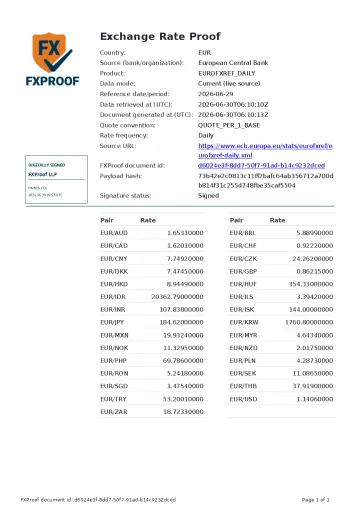
The Signed FXProof Proof PDF keeps source attribution, selected date, rate context, digital signature, document id, payload hash, and public verification details together. A later reviewer can check the proof without access to your accounting system.
Keep responsibility in the right place
FXProof does not audit Xero, QuickBooks, NetSuite, SAP, Sage, or any other software. It documents the supported official reference input you selected and leaves accounting treatment, system configuration, and recipient acceptance outside the proof.
Compare one ledger input with a reference proof
Illustrative ledger entry: an invoice for EUR 100 uses USD 1.14 per EUR on 2026-06-29. The ledger amount and rounding policy are example inputs, not an observation about any software.
| Record | Source and date | Direction and precision | Reason to keep both |
|---|---|---|---|
| Ledger entry | Illustrative entry dated 2026-06-29 | USD 1.14 per EUR; two displayed decimals | Preserve the amount and rate actually recorded by the ledger. |
| Selected reference proof | ECB sample, 2026-06-29 | EUR/USD 1.14060000; eight decimal places | Different displayed precision can explain a rounded ledger rate; it does not prove the software algorithm. |
Download the sample PDF. Official source. Keep the calculation and rounding decision beside the proof.
Reconcile a mismatch
See how to separate source, date, direction, precision, and bank-rate questions before keeping a proof.
Open reconciliation use caseAccounting record
See where the signed proof belongs beside entries, schedules, reconciliations, and close support.
Open accounting use caseSource catalog
Start with the official source your file requires before opening a proof in the account workflow.
View sourcesQuestions
Does FXProof prove which source my accounting software used?
No. Keep the software record separately. FXProof documents the supported official reference source and date you selected for the supporting proof.
What should I compare when the ledger rate does not match?
Check source, selected date, currency-pair direction, decimal precision, rounding, posting date, and whether the ledger used a bank transaction rate or an official reference rate.
Can a reviewer verify the proof without using my accounting software?
Yes. The reviewer can inspect the proof PDF and use the document id and payload hash on the public verification page.