
Do I need to save anything besides the signed proof PDF?
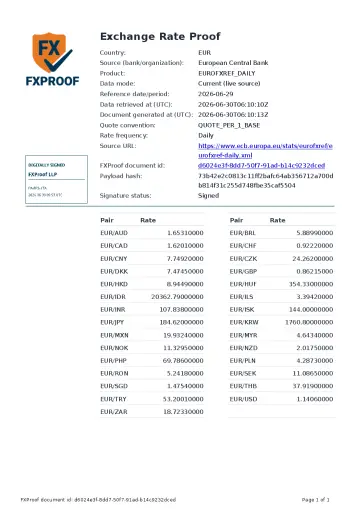
No additional FXProof verification data needs to be stored separately. The Signed FXProof Proof PDF contains its source and rate context, document id, payload hash, digital signature, and verification information.
Optional Screenshot of Source Page PDF and Original Source PDF files can provide extra source context when available, but they are not required to verify the signed proof PDF.
How should I use the PDF?
Attach the signed proof PDF to the accounting entry, close file, audit workpaper, tax workpaper or schedule, invoice or declaration file, expense record, or other business record that used the exchange rate.
- Source attribution and selected date.
- Rate context used for the proof.
- Document id and payload hash shown inside the PDF.
- Embedded digital signature.
- Verification information and public check path.
What happens if the signed PDF is changed?
A change made after signing should cause embedded digital-signature validation to fail. The payload hash serves a different purpose: it identifies the recorded proof payload and is not a byte-for-byte hash of the final signed PDF.
The public FXProof check separately compares the document id and payload hash shown in the PDF with recorded verification metadata.
Sample first
Review the sample proof to see the PDF layout and proof fields before deciding how to use it in your workflow.
View a proof sampleHow verification works
See how a recipient checks the document id and payload hash shown in the PDF.
Read verification guideSource context
When the file needs a specific official source, start from the source page and keep the source attribution visible.
View sourcesQuestions
Do I need to save anything besides the signed proof PDF?
No additional FXProof verification data needs to be stored separately. Keep the PDF with the business record it supports. Optional bundle files can add source context.
How should I use the signed proof PDF?
Attach it to the record that used the rate, such as an accounting entry, workpaper, tax schedule, invoice file, or expense record.
What can a recipient verify in the PDF?
The recipient can inspect the source and rate context, validate the embedded digital signature, and use the document id and payload hash on the public FXProof check page.
What happens if the signed PDF is changed?
A change after signing should cause embedded digital-signature validation to fail. The payload hash is a separate proof-payload identifier, not a byte hash of the signed PDF.