How can someone verify the document later?
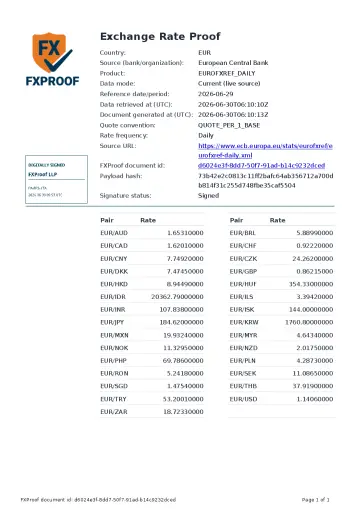
Use the document id and payload hash shown in the Signed FXProof Proof PDF. The public check compares those values with recorded FXProof verification metadata.
It is designed for the person receiving the proof document: an auditor, client, manager, tax consultant, compliance reviewer, or internal control owner.
What does the public check confirm?
The check confirms whether the submitted document id and payload hash match an available FXProof record. It does not calculate the rate again and does not use a byte hash of the final signed PDF.
- Document id from the proof document.
- Payload hash from the proof document.
- The verification result shown by FXProof.
Digital signature and acceptance are separate
Embedded digital-signature validation can reveal changes to the signed PDF. The public FXProof check uses the document id and payload hash instead. Neither check decides whether a recipient, authority, auditor, or procedure will accept the document for a specific purpose.
Fast recipient check
The public check page lets a recipient verify document id and payload hash without logging in.
Check a proof documentWhat to compare
Compare the result to the proof document and to the file context that used the exchange rate.
Audit hand-off
See what a preparer should send with the workpaper so the recipient can inspect the proof without account access.
Review the audit hand-offInternal control review
Use verification as one repeatable check inside a broader control record owned by the organization.
Open internal control use caseNeed a sample?
Use a sample proof to see where the document id and payload hash appear.
View a proof sampleQuestions
How can someone verify the exchange-rate document later?
Use the document id and payload hash shown in the PDF on the public FXProof verification page. No preparer account access is required.
What does the public check confirm?
It confirms whether the submitted document id and payload hash match recorded FXProof verification metadata. Embedded digital-signature validation is a separate check.
Does verification guarantee acceptance?
No. Verification confirms FXProof metadata or signature integrity, depending on the check used. Acceptance depends on the recipient, procedure, and jurisdiction.
What if verification fails?
Check that the document id and payload hash were copied exactly from the proof document. If the values still do not verify, treat the document as not verified.